5 Steps to UK Website Accessibility Law Compliance: Equality Act, PSBAR

You have to plan for disabled users before they ever hit your site, not scramble to fix things after a complaint lands. The Equality Act 2010 puts an anticipatory duty on you to make reasonable adjustments. Public sector bodies must also meet PSBAR and be tested against WCAG 2.2 AA, and that same standard is the sensible benchmark for everyone else too. In practice, that means an accessibility statement, a proper audit, fixing what matters most first, and keeping a paper trail.
TL;DR:
- Most UK organizations must meet WCAG 2.2 AA standards, with public sector sites subject to stricter PSBAR 2018 requirements and publication of an accessibility statement.
- The Equality Act 2010 requires all service providers to proactively address accessibility, regardless of site age or technology, to prevent discrimination claims.
- Private businesses should document audits, fixes, and ongoing checks to prove reasonable adjustments, especially since complaints rather than court rulings are the common enforcement route.
- Incorporating WCAG 2.2 AA criteria into procurement contracts and requesting audit evidence can prevent the buildup of compliance gaps over time.
- Relying solely on overlay widgets is ineffective, as they do not resolve fundamental accessibility barriers and are weak defenses if challenged.
Table of Contents
- Which UK accessibility laws actually apply to your website?
- What standard should your website actually meet?
- Does your organisation and content fall within scope?
- How do you actually get compliant? A step-by-step checklist
- What happens if you ignore it: enforcement and real risk
- Building accessibility into procurement and contracts
- Where to find UK accessibility guidance and templates
- How we think about accessibility when we build
- Want an accessible website without the agency price tag?
- Sources
- FAQ
Which UK accessibility laws actually apply to your website?
Two pieces of law do the heavy lifting here, and they don’t say quite the same thing.
The Equality Act 2010 applies across England, Scotland and Wales. Sections 20 and 29 require service providers to make reasonable adjustments so disabled people aren’t put at a substantial disadvantage. Crucially, this is an anticipatory duty. You’re expected to think about barriers before someone hits one, not wait for a complaint and then scramble. This is the primary source of accessibility obligations for service providers, and it applies whether you sell trainers, run a solicitors’ practice, or manage a parish council newsletter.
If you’re a public sector body, you carry an extra, more prescriptive layer: PSBAR 2018. It sets out clear obligations, a “presumed conformity” test against WCAG, and a legal duty to publish an accessibility statement in a model format. Deadlines for new and existing sites have already passed, so if you’re covered by PSBAR and haven’t done this, you’re already behind.
Northern Ireland runs on the Disability Discrimination Act 1995 rather than the Equality Act, though the practical effect on reasonable adjustments is broadly similar. If you operate UK-wide, don’t assume one legal reference covers you everywhere.
One more wrinkle worth knowing: if you supply websites, apps, or digital tools to a public sector body, that contract can drag PSBAR-style obligations straight into your business, even if you’re a private supplier.
- Equality Act 2010: anticipatory duty, applies UK-wide (with a Northern Ireland variation)
- PSBAR 2018: prescriptive rules for public sector, includes accessibility statement duty
- Northern Ireland: Disability Discrimination Act 1995, similar principle, different statute
- Public sector contracts: can pull private suppliers into PSBAR-level obligations
What standard should your website actually meet?
WCAG 2.2 Level AA is the practical answer, full stop.
WCAG stands for Web Content Accessibility Guidelines, built by the W3C around four principles: content must be perceivable, operable, understandable, and robust (often shortened to POUR). It’s not UK law in the sense of a named Act, but both the Government Digital Service and the EHRC treat WCAG 2.2 AA as the working definition of “reasonable”. If you’re ever asked to prove you made reasonable adjustments, this is the yardstick you’ll be measured against.
WCAG 2.2 added some genuinely practical criteria that catch a lot of modern websites out:
- Focus not obscured: a sticky header or cookie banner can’t hide the element a keyboard user has just tabbed to
- Target size (minimum): buttons and links need to be big enough to tap reliably, not tiny icons crammed together
- Consistent help: if you offer a help link or chat widget, it needs to appear in the same place across pages
None of this gets fixed by a scanner alone. A solid testing mix combines automated tools, manual inspection by someone who understands assistive technology, and testing with actual disabled users. A significant number of people in the UK live with a disability, so skipping the human testing step means guessing at what the majority of your affected audience actually experiences.
Does your organisation and content fall within scope?
Public bodies get the strictest treatment. PSBAR covers most public sector websites and apps, though it does allow narrow exemptions for things like pre-2018 archived documents not needed for active administrative processes.
Private businesses sit under the Equality Act’s broader, less prescriptive net. If you provide a service to the public, and most websites do, the anticipatory duty applies to you regardless of your size.
A few scope points catch people out repeatedly:
- Intranets and extranets can fall outside PSBAR in specific circumstances, but the Equality Act’s general duty can still bite
- PDFs, old Word documents, and scanned forms are frequently the least accessible part of a site, and often need an accessible alternative format offered alongside them
- If you serve customers in the EU, their own accessibility rules may apply on top of UK law, so check where your audience actually sits before assuming UK compliance is enough
How do you actually get compliant? A step-by-step checklist
Right, enough theory. Here’s the order to actually do this in.
- Publish an accessibility statement. State what standard you’re targeting, what’s not yet compliant, and give a clear way for people to report problems. GOV.UK’s model format is the sensible template to follow even if PSBAR doesn’t apply to you.
- Commission or run an audit. Combine automated scanning with manual inspection by someone who genuinely understands assistive technology, plus testing with real disabled users where you can manage it.
- Prioritise by impact, not by ease. Fix broken checkout flows, unusable forms, and navigation that traps keyboard users before you touch cosmetic colour-contrast issues on a footer nobody reads.
- Document everything. Keep the audit report, the remediation plan, and dates for each fix. This record is exactly what regulators and courts want to see if a complaint ever arrives.
- Build in ongoing checks. Set a review cadence, train whoever adds content to the site, and test again after every significant redesign.
Pro Tip: Don’t let your accessibility statement become a “set and forget” document. Update it every time you fix something, or it starts working against you as evidence you knew about a problem and did nothing.
What happens if you ignore it: enforcement and real risk
Complaints are the usual starting point, not a court summons out of nowhere. For public bodies, the Cabinet Office and GDS run active monitoring and can flag non-compliant statements directly. The EHRC can also investigate and enforce under the Equality Act.
Realistic outcomes tend to be an enforced accessibility statement update, a formal remediation timetable, or in private-sector disputes, a claim for damages or an injunction requiring changes. Most pressure in the UK arrives through complaints and settlements rather than headline court judgments, which is exactly why documentation matters so much.
A quick word on overlay widgets, the little accessibility icon plugins promising instant compliance: they generally don’t remove the underlying barriers that assistive technology users actually hit, so they’re a weak defence if challenged.
- Keep dated audit reports and remediation plans as your evidence trail
- Offer accessible alternatives for anything you can’t fix immediately
- Don’t rely on an overlay as your only accessibility measure
Building accessibility into procurement and contracts
If you commission a website from a developer or agency, put accessibility acceptance criteria into the contract itself, not into a verbal promise. Ask suppliers for evidence: a written audit report, a remediation plan, and test artefacts showing what was actually checked.
Set a monitoring cadence rather than a one-off tick. Periodic audits, checks at every release, and occasional user research keep standards from quietly slipping as content gets added.
- Write WCAG 2.2 AA into supplier contracts as an acceptance requirement
- Request audit evidence, not just a verbal assurance of compliance
- Schedule recurring checks, not a single pre-launch review
- Keep records showing reasonable steps were taken, since this is your defence if challenged
Cutting corners at the procurement stage is a common way accessibility debt builds up quietly. Our piece on why cheap website builds fail covers the wider pattern.
Where to find UK accessibility guidance and templates
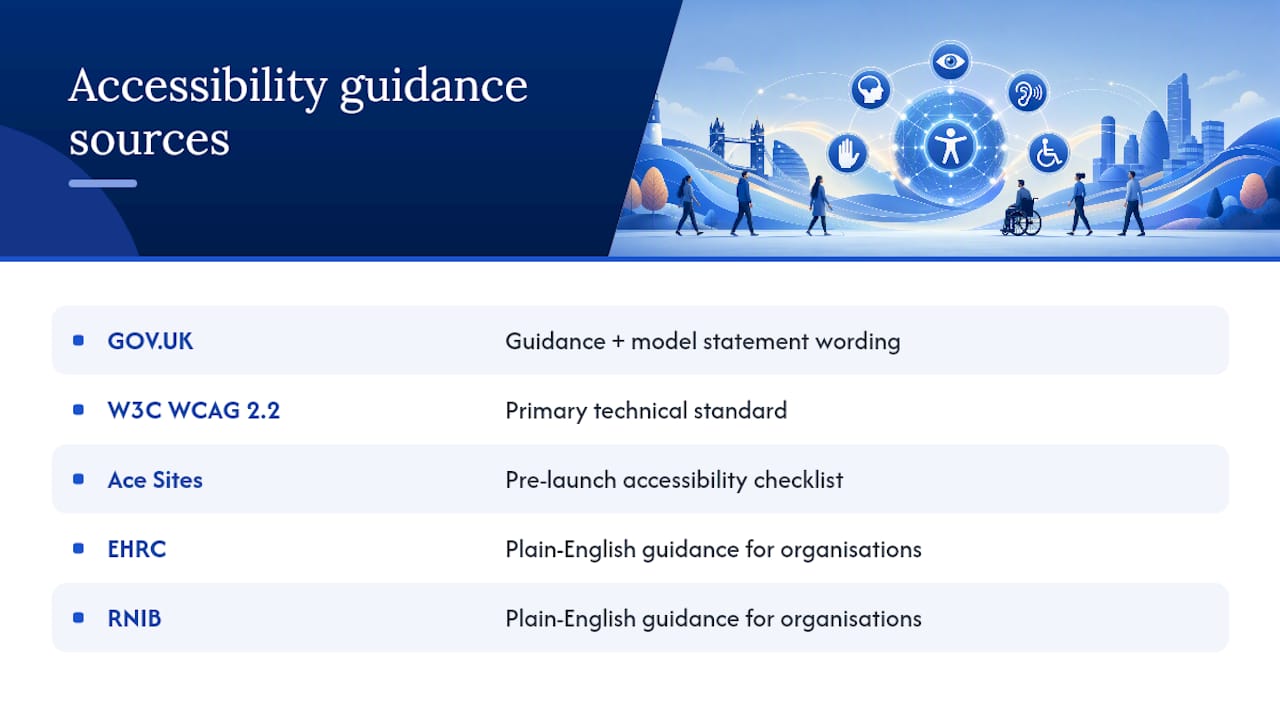
Start with GOV.UK’s guidance on meeting equality and accessibility regulations, which includes the model accessibility statement wording. For the technical standard itself, the W3C’s WCAG 2.2 specification is the primary reference. For a pre-launch checklist, Ace Sites’ accessibility checklist is a genuinely useful practical resource, and the EHRC and RNIB both publish plain-English guidance for organisations getting started.
How we think about accessibility when we build
We build websites for small businesses, not government departments, but the same principle holds. Every build starts with an audit mindset, uses WCAG-informed patterns as standard rather than an afterthought, and gets checked with real testing before it goes live. Fast turnaround doesn’t mean cutting corners on this. Documenting what we checked and fixed gives our clients something genuinely useful too: a paper trail that supports their own position under the Equality Act, should anyone ever ask.
— Conor
Want an accessible website without the agency price tag?
Many agencies charge substantial amounts to bolt accessibility onto a site as an “extra”. We think that’s backwards. Websites can be built with WCAG-informed patterns from day one, backed by managed hosting, monthly updates, and with options that start from an affordable monthly price.
If you’re worried your current site is a liability rather than an asset, that’s worth fixing properly rather than papering over with an overlay widget. Have a browse of our website examples to see what a properly built small business site looks like, or head to our services page to see what’s included. Ready to sort it? Get in touch for an accessibility-focused quote and we’ll tell you honestly what needs doing, and what doesn’t.
Sources
FAQ
Can you be sued in the UK for your website not being accessible?
Yes, private organisations can face claims under the Equality Act 2010 if they fail to make reasonable adjustments, though most disputes are resolved through complaints and settlements rather than court judgments.
What are the legal requirements for websites in the UK?
Public sector websites must meet PSBAR 2018 and publish an accessibility statement, while private sector sites fall under the Equality Act’s anticipatory duty to make reasonable adjustments, with WCAG 2.2 AA as the practical benchmark for both.
Is WCAG 2.2 a legal requirement in the UK?
WCAG 2.2 AA is a legal requirement specifically for public sector bodies under PSBAR, and while it isn’t named in the Equality Act itself, regulators and courts treat it as the standard evidence of reasonable adjustments for everyone else.
Can you get sued for not having accessibility on your website?
You can face a claim under the Equality Act if a disabled user is put at a substantial disadvantage and no reasonable adjustments were made, which is why keeping audit records and a remediation plan matters as evidence.