Front Load Your Pages to Win AI Overviews and Cover 6–8 Subqueries
Optimising for AI Overviews comes down to three things: extractable, front-loaded answers; clean crawl and schema access; and proof that your content is worth citing. Get those right and you materially raise your odds of a citation. Google’s own Search Central guidance confirms there’s no separate technical bar beyond normal Search eligibility, Search Console gives you a generative AI control to check the effect, and Basic-bs builds AI-readiness into every site it ships. What follows is the checklist we’d actually run this week, not a theory lecture.
TL;DR:
- Ensure your top pages are properly indexed by checking robots.txt, noindex tags, and crawl access, as failure here prevents AI citation regardless of content quality.
- Rewrite the opening sentences of your key pages to deliver the main answer immediately and craft questions as the exact queries users search.
- Use and validate FAQPage, HowTo, and Article schema in JSON-LD to match your visible content precisely and monitor schema health regularly through Google tools.
- Map out and address six to eight sub-queries related to your main topic on each page to improve fan-out coverage and increase chances of being cited in AI Overviews.
- Prioritize fixing crawl and indexing issues first, then test content restructuring and schema additions on high-traffic pages before scaling efforts across your site.
Table of Contents
- Your AI Overviews optimisation checklist for this week
- Are your pages even eligible to be crawled and indexed?
- How do you write content that AI systems can actually extract?
- Which schema types actually help, and how do you validate them?
- How do you measure whether your AI Overviews optimisation is working?
- What is fan-out coverage, and why does it decide whether you get cited?
- Do videos and third-party mentions actually help?
- How do you opt out of AI Overviews if you don’t want to appear?
- Where teams actually get stuck, and what’s worth doing first
- Want this done for you, properly, without the guesswork?
- Sources
- FAQ
Your AI Overviews optimisation checklist for this week
Forget the twelve-month roadmap. Here’s what shifts citation odds in days, not quarters.
Technical quick wins:
- Check
robots.txtisn’t accidentally blocking key pages, and confirm no straynoindexornosnippettags are sitting on your best content. - Verify Google-Extended isn’t blocked if you want your content available to Gemini-linked crawling and AI features.
- Run URL Inspection in Search Console on your top ten pages to confirm they’re actually indexed, not just submitted.
Authoring quick wins:
- Rewrite your top three page openings so the answer lands in the first sentence, not the third paragraph.
- Turn your headings into the actual questions people type.
- Add FAQPage schema to any page that already answers common questions in prose, even informally.
Measurement quick wins:
- Turn on the Search generative AI control in Search Console so you know your inclusion settings.
- Set a baseline: screenshot how your top pages appear in AI Overviews today before making any changes.
Pro Tip: Run this as a proper before-and-after. Pick five pages, note today’s AI Overview appearance (or absence), make the changes, then check again after two weeks. Anything shorter and you’re measuring noise, not signal.
Are your pages even eligible to be crawled and indexed?
If Google can’t crawl, render, and index a page normally, it has no chance of being cited in an AI Overview. That’s not a guess. Google’s own guidance states there are no additional technical requirements beyond standard Search eligibility to appear in AI-generated features, which means the fundamentals you already know still gatekeep everything downstream.
Three things quietly sink pages more often than people expect. A robots.txt rule blocking a folder that used to be irrelevant and now holds your best content. A noindex tag left over from a staging build that never got removed. Or a CDN or firewall rule that blocks certain crawler user-agents, including Google-Extended, the token that governs access for Google’s generative AI features. None of these throw an error you’ll notice from the front end. They just quietly remove you from the running.
Here’s the check sequence worth handing to your engineers this week:
- Audit
robots.txton the live domain, not a cached version, and confirm no disallow rule touches your priority pages. - Search-console-check indexing status for those same pages using URL Inspection, and fix anything flagged as “Discovered, not indexed” or “Crawled, not indexed.”
- Confirm Google-Extended access isn’t restricted in
robots.txt, since blocking it can quietly opt content out of some generative features. - Run the Rich Results Test on pages carrying schema to confirm Google can parse what you’ve marked up.
- Pull server logs for Googlebot activity to confirm the crawl frequency matches what you’d expect for a page’s importance.
- Check rendered HTML against source HTML using “View Rendered Source” in Chrome DevTools, because JavaScript-heavy pages sometimes render differently for crawlers than for users.
None of this is glamorous. It’s also the bit that gets skipped most often, because “the page loads fine in my browser” feels like enough evidence. It isn’t.
How do you write content that AI systems can actually extract?
Write the answer first, in plain terms, inside the opening 40 to 60 words of the section. That single habit is the strongest lever you have, and it’s not opinion: one practitioner case study reported a 169% lift in conversions and an 809% jump in AI referral traffic after restructuring content this way, according to Search Engine Journal’s coverage of Google’s AI Overview guidance.
Pro Tip: *That
figure came from one documented case, not a universal guarantee. Treat it as proof the tactic works, not a promise of your own results.*
The mechanics matter more than the theory. Structure each section like this:
- Lead with the definition or verdict, using the “X is Y” pattern rather than building up to it.
- Phrase headings as the question a user would actually type, not a vague topic label.
- Keep paragraphs to two to four sentences, so a model (or a human skimming on a phone) can lift a complete thought without losing context.
- Bold the specific fact or figure inside a sentence, so it’s visually and structurally distinct from surrounding filler.
- Make each section self-contained, meaning it should still make sense if extracted on its own, with no “as mentioned above” dependencies.
Attribution matters here too, and it’s worth doing properly rather than vaguely. When you cite a statistic, name the source and link it inline, on the figure itself, not buried in a “sources” list at the bottom. Compare these two sentences:
Weak: “Some studies suggest content restructuring helps AI visibility.”
Stronger: “One documented case study recorded an 809% increase in AI referral traffic after restructuring for extractability.”
The second version gives a model, and a sceptical reader, something concrete to hang trust on. Vague attribution reads as filler even when the underlying claim is true. Tools like Konvuno are built specifically around this question-first content pattern, which is worth a look if you’re rebuilding site architecture around extractable Q&A rather than bolting FAQ blocks onto old pages.
Which schema types actually help, and how do you validate them?
Use Article or BlogPosting schema for standard content, FAQPage schema for genuine question-and-answer sections, and HowTo schema for step sequences, and mark all three up in JSON-LD rather than microdata, because JSON-LD is cleaner to maintain and less prone to markup errors. Practitioner reporting and Google’s own guidance both note a strong relationship between correctly implemented FAQPage and HowTo schema and a page’s likelihood of being pulled into AI answers, as detailed in Moz’s analysis of AI Overview optimisation.

The rule that trips people up most: your schema must mirror your visible text exactly. If your FAQPage schema claims an answer that isn’t actually present, word for word or close to it, on the page a user sees, that’s a mismatch Google can penalise rather than reward. Same goes for dates. A schema block claiming a “datePublished” that doesn’t match what’s shown on the page is a red flag, not a shortcut.
Before you ship any schema change, run through this:
- Validate every markup change in Google’s Rich Results Test, not just once at launch but after every edit.
- Cross-check schema against visible copy line by line for FAQPage and HowTo blocks specifically.
- Confirm dates are genuinely accurate, not defaulted to “today” by a lazy CMS template.
- Monitor schema health in Search Console under the Enhancements section, where structured data errors surface over time.
- Re-test after CMS updates, since plugin or template changes quietly break schema more often than content edits do.
Get this right once and it keeps working. Get it wrong and you’re training Google to distrust your markup, which is a much slower thing to undo.
How do you measure whether your AI Overviews optimisation is working?
Use the Search generative AI control in Search Console to see and manage your inclusion status, then pair that with manual spot-checks, because the dashboard tells you eligibility, not actual citations. The control lets you include or exclude your site from generative AI features and typically takes one to two days to propagate once you change a setting.
Here’s the measurement sequence that actually tells you something:
- Check your generative AI performance report in Search Console for impression and click trends tied to AI-surfaced results.
- Track AI impressions against total impressions as a ratio, not just a raw number, so you can spot genuine shifts.
- Run manual searches on your priority queries weekly, screenshotting whether and how you’re cited, since no dashboard shows you the actual wording used.
- Watch citation click-throughs specifically, because general click behaviour tends to fall when an AI summary appears, so a citation’s value often shows up in brand recall more than raw traffic.
Set expectations properly with your team here. Crawl and inclusion setting changes can show effects within days. Actual citation shifts, meaning Google deciding your restructured page is now worth quoting, tend to take weeks, sometimes longer for competitive queries. Google has also been expanding inline links and Preferred Sources controls in AI features, which is worth watching because it changes how much visible credit a citation gives you.
What is fan-out coverage, and why does it decide whether you get cited?
Map the 8 to 12 sub-queries a genuine searcher has around your topic, and aim to cover 6 to 8 of them properly on a single page, because generative models build answers by pulling from sources that address the full spread of a question, not just its headline version. This is what’s known in practitioner circles as the fan-out coverage model, and it’s arguably the least understood lever in AI Overview optimisation.
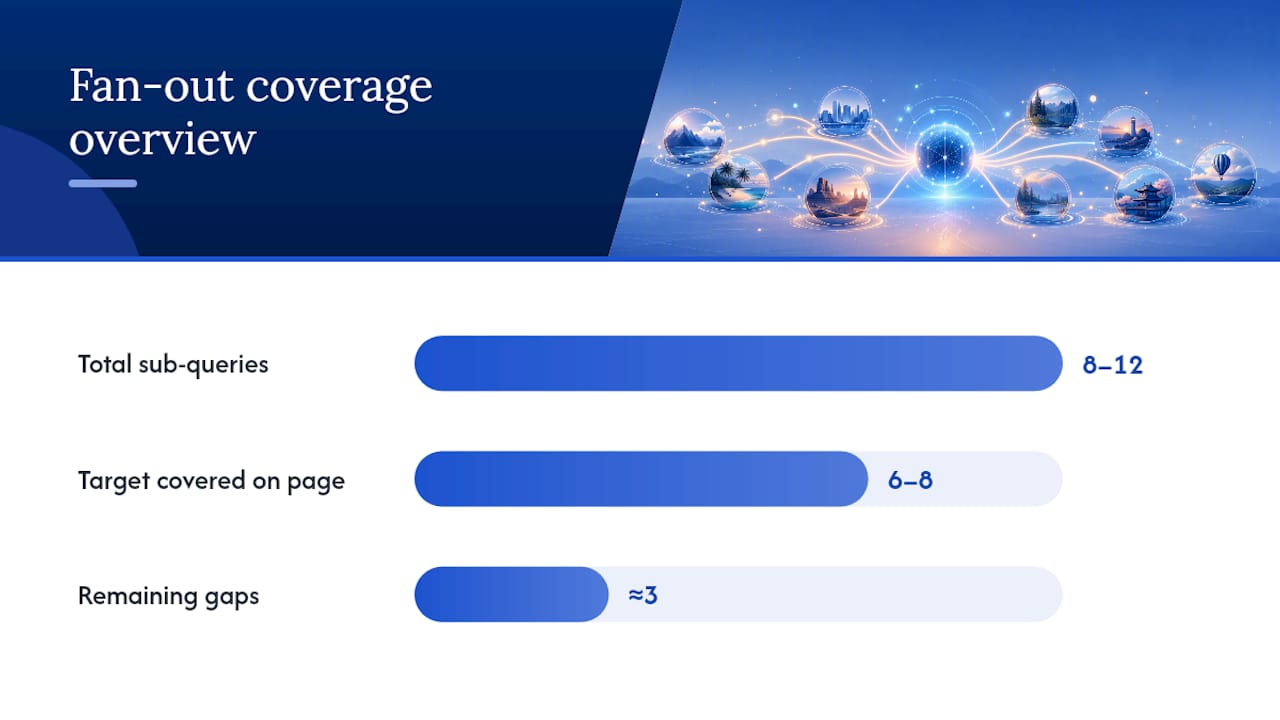
Think of a page ranking for “how to register a limited company.” The headline query is one thing. The fan-out includes cost, timeline, required documents, what happens if you’re rejected, whether you need an accountant, and how it differs for sole traders considering the switch. A page that answers only the headline query, brilliantly, still loses to a page that answers six of those eight surrounding questions adequately.
Finding those sub-queries isn’t guesswork. Pull them from:
- Google’s “People Also Ask” boxes on the exact query you’re targeting, not a rough synonym.
- AnswerThePublic, which clusters real search phrasing by question type.
- Reddit threads and niche forums, where people phrase the same question in ways keyword tools miss entirely.
- Your own Search Console query data, filtered to the page in question, showing what people already type to land there.
Once you’ve got the list, the editorial decision is whether to answer everything on one page or split into supporting micro-pages, interlinked back to the main piece. Cross-industry analysis of what’s driving Overview selection points to semantic completeness and freshness as recurring signals worth building into either structure.
Pro Tip: Don’t try to close every gap in one edit. Pick your highest-traffic page, map its fan-out properly, close three or four of the biggest holes, and measure before moving to the next page. Fan-out coverage rewards depth done properly, not breadth done thinly.
Ownership matters as much as the mapping. Assign someone to revisit your top ten pages monthly, and your highest-priority commercial pages weekly, because fan-out gaps reopen as search behaviour shifts. If you’re rethinking how content gets produced at that pace, AmmarAI’s work on AI-assisted content workflows is worth a look for keeping that cadence without burning out a small team.
Do videos and third-party mentions actually help?
Yes, and the mechanism is straightforward: a short explainer video with a full transcript gives generative models an additional structured source to pull from, and a mention on an independent site gives Google a corroborating signal that your claim isn’t just self-reported.
A few practical moves worth prioritising:
- Produce 60 to 90 second explainer videos for your highest-value pages, with a complete, accurate transcript published alongside them, not just an auto-caption dump.
- Write video descriptions that match your page’s core answer, so the two reinforce each other rather than saying slightly different things.
- Pursue mentions on genuine industry blogs and niche forums relevant to your sector, rather than generic guest-post directories.
- Track referral and brand-search upticks after securing a mention, since that’s often the clearest proxy you’ll get for its effect.
Third-party brand presence matters more than most SEO checklists admit, because it widens the pool of material an AI system has to draw conclusions from about your credibility, not just your content.
How do you opt out of AI Overviews if you don’t want to appear?
Use the Search generative AI control in Search Console and set your preference to exclude your site from generative AI features. Google confirms this setting is available directly in Search Console, and exclusion generally propagates within a few days once you save the change.
It’s worth being clear about what this does and doesn’t do. Opting out of the generative AI control removes your eligibility for AI Overviews and related generative features specifically. It does not remove you from standard organic Search results, and it’s not the same as blocking Googlebot entirely, which would tank your visibility across the board.
Some sites choose to block Google-Extended specifically via robots.txt instead, which governs access for certain generative AI training and feature uses, though the exact scope of what that blocks can shift as Google updates its systems, so check current documentation before relying on it as your sole method.
Why would a business actually want to opt out? A few genuine reasons come up in practice: highly regulated content where a paraphrased AI summary risks losing critical caveats, subscription or paywalled content where a free summary undermines the business model, or brand-sensitive material where losing control of the exact wording matters more than the traffic. For most commercial sites, though, exclusion trades away free visibility for very little protection, so it’s a decision worth making deliberately, not by default.
Where teams actually get stuck, and what’s worth doing first
Most teams don’t fail at AI Overview optimisation because the tactics are hard. They fail because they try to do all eleven things in this guide at once, on every page, and burn out three weeks in with nothing to show for it.
If you’ve got limited capacity, fix crawl and indexing eligibility first, always. No amount of beautiful front-loaded prose matters if the page isn’t indexed properly. After that, rewrite the openings of your five highest-traffic pages before touching schema, because extractability changes tend to compound faster than markup changes.
Run one experiment properly rather than five experiments badly. Pick a single page, restructure the opening, add matching FAQPage schema, screenshot its current AI Overview status, then check again in two weeks. That’s your proof of concept before you scale the effort across a site.
— Conor
Want this done for you, properly, without the guesswork?
Most businesses reading this don’t have a spare engineer and a content team to run fan-out mapping and schema audits every month. That’s fair. It’s genuinely time-consuming work, done properly.
Our service builds AI readiness into sites from day one rather than bolting it on after launch, which is where most cheap builds fall down. Every site comes with proper crawl access, structured data that matches the visible content, SEO, and managed hosting with SSL sorted from the start, all for a flat monthly plan with zero upfront fees. Sites go live in a matter of days, and monthly updates mean the fan-out and schema work in this guide is maintained after launch, unlike with some lower-cost alternatives on the market. Read why cheap website development fails if you want the honest version of why a bargain build usually costs more later.
If you’d rather have this implemented properly than DIY it from a checklist, take a look at what’s included in Website Build, AI Training, SEO & UK Hosting and get in touch about your site this week.
Sources
For the policy detail behind everything above, Google Search Central’s AI optimisation guide is the primary reference. Pair it with Search Console’s generative AI control documentation for the include/exclude mechanics, and SEMrush’s AI Overviews guide for a practitioner-level view of the fundamentals plus AI-specific tactics.
- Search Engine Journal — Google’s official advice on optimising for AI Overviews & AI Mode
- Google Search Central — Optimizing your website for generative AI features on Google Search
- Search Console help — Search generative AI control
FAQ
How do you optimise for Google AI Overviews?
Front-load the direct answer within the first 40 to 60 words of a section, keep crawl and indexing access clean, and mark up genuine Q&A and step content with FAQPage or HowTo schema in JSON-LD.
What is the 80/20 rule in SEO, and does it apply to AI Overviews?
The 80/20 rule generally means roughly 80% of your results come from 20% of your efforts, usually your highest-traffic pages, so for AI Overview work it means fixing extractability and schema on your top pages first rather than spreading effort thinly across a whole site.
How can you improve AI search optimisation on an existing site?
Audit your top pages for crawl and indexing errors first, then rewrite their opening sentences to lead with the answer, add matching structured data, and track results using the generative AI performance report in Search Console.
How do you avoid or opt out of AI Overviews?
Set your preference in the Search generative AI control inside Search Console to exclude your site from generative AI features, which typically takes one to two days to take effect, though it won’t remove you from standard organic results.
Does Basic-bs help with AI Overview optimisation specifically?
Yes. Basic-bs builds crawl-friendly structure, matching schema, and AI-readiness into every website plan from launch, rather than treating it as a separate add-on project.